Chess on a Tablet for Two Players: Face to Face
A tablet lying flat on a table makes a surprisingly good chessboard: big squares, no pieces to lose, and both players can sit opposite each other like at a real board. The only problem is that one player sees the pieces upside down. Table mode fixes that.
Short answer: open a browser chess board on the tablet, turn on Table mode (the far player's pieces turn to face them), lock the screen rotation, and lay the tablet flat between you. On this site: choose Tablet flat, face to face on the start screen and the game starts.
Three ways to share a tablet
| How you sit | Best mode | What happens |
|---|---|---|
| Opposite each other, tablet flat on the table | Table mode | The board stays still; the far player's pieces and name are rotated to face them. |
| Next to each other on a sofa | Fixed | White stays at the bottom; press Flip any time. |
| Handing the tablet back and forth | Pass & flip | After each move the board turns so the player to move sees their pieces at the bottom. |
How Table mode works
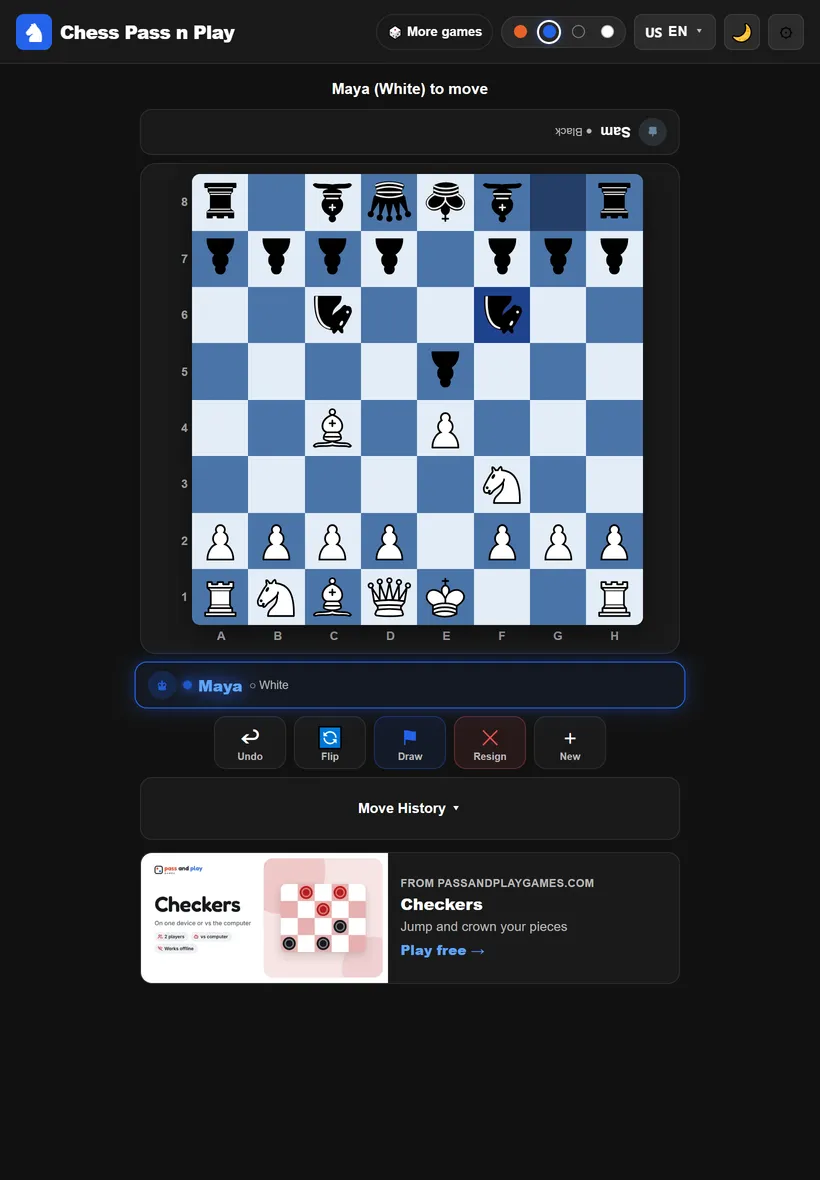
In Table mode the board never moves. White plays from the near side, Black from the far side. Black's pieces, and the bar with Black's name and clock, are drawn upside down from the near player's view, which is the right way up for the person sitting opposite.
Setting up an iPad or Android tablet
- Lock the screen rotation. A tablet lying flat often thinks it has been turned and spins the screen. On iPad, open Control Center and tap the rotation lock; on Android, turn off "Auto-rotate" in the quick settings.
- Open the board in the browser (Safari, Chrome or any modern browser). No app or account is needed.
- Add it to the home screen for a full-screen board: Share → "Add to Home Screen" on iPad, or the browser menu → "Install app" / "Add to Home screen" on Android.
- Choose "Tablet flat, face to face" on the start screen and, if you like, a clock under Options.
- Lay the tablet flat with the board between you and start playing: White moves first.
Tips for a comfortable game
- Brightness and glare: lying flat under a ceiling light can cause reflections; tilt the tablet slightly with a thin book under one edge.
- Keep the screen awake: the board asks the device not to dim during a game, but long thinks may still trigger auto-lock on some tablets; set auto-lock to a longer time.
- No internet? After your first visit the board also opens offline, handy for trips.
- Teaching a child? Leave move hints on: tapping a piece shows every square it can go to.
- Mistake? Undo takes back exactly one move.
Browser board or app?
Dedicated chess apps can do more (computer opponents, online play, puzzles), but for two people sitting at one table a browser board has advantages: nothing to install, no account, and it works the same on any tablet. If you later want to play someone who is not in the room, an online chess site is the better tool.
Questions
Does it work on an iPad?
Yes. The board runs in Safari or any other modern browser on iPad, and on Android tablets in Chrome, Samsung Internet or Firefox.
Why does the screen keep rotating when the tablet is flat?
The motion sensor guesses the orientation. Turn on rotation lock (iPad) or turn off Auto-rotate (Android) before you start.
Can we use a clock?
Yes: 1, 3, 5 or 10 minutes per player, with an optional 2 or 5 second increment. Each player's clock is shown next to their name.
Try it on a real board: free, no sign-up, set up in seconds.
♟ Play a two-player game